---
title: How does Atomize utilize compset data?
description: Atomize benchmarks your hotel’s pricing against your competitor's on a daily basis and uses competitor rates as one key input in the optimization model to calculate your optimal price. Rather than foc
---
[Skip to content](https://help.atomize.com/migration/how-does-atomize-utilize-comp-set-data#main-content)
English
Show submenu for translations
![Atomize- blue-1.png\]](https://help.atomize.com/hs-fs/hubfs/Atomize-%20blue-1.png?height=40&name=Atomize-%20blue-1.png)
- [Sample Contact Page](https://atomize-4112891.hs-sites.com/sample-contact)
- [Sample About Page](https://atomize-4112891.hs-sites.com/sample-about)
- [Default HubSpot Blog](https://atomize-4112891.hs-sites.com/blog)
Open main navigation
Close main navigation
- [Sample Contact Page](https://atomize-4112891.hs-sites.com/sample-contact)
- [Sample About Page](https://atomize-4112891.hs-sites.com/sample-about)
- [Default HubSpot Blog](https://atomize-4112891.hs-sites.com/blog)
- English
Show submenu for translations
- Go to atomize.com
Go to atomize.com
Hello. How can we help you?
- There are no suggestions because the search field is empty.
1. [Customer Knowledge Base](https://help.atomize.com/migration?hsLang=en)
2. [Features and functionalities](https://help.atomize.com/migration/features-and-functionalities?hsLang=en)
3. [Compset data](https://help.atomize.com/migration/features-and-functionalities?hsLang=en#compset-data)
# How does Atomize utilize compset data?
Atomize benchmarks your hotel’s pricing against your competitor's on a daily basis and uses competitor rates as one key input in the optimization model to calculate your optimal price.
Rather than focusing on the competitor price level alone, Atomize detects *changes* in competitor pricing over time and interprets these shifts as potential demand signals. For example, if your competitors are suddenly increasing or decreasing their prices for specific dates, Atomize will factor this into its demand assessment and price optimization.
To help you gain further insight, Atomize also allows you to view competitor prices per stay date and room type. To ensure a like-for-like comparison, we recommend that you map your competitors’ room types to your own. This way, you will see the relevant competitor price alongside each of your room types, and you will also be able to identify when a competitor’s room type is unavailable—providing you with additional context and strategic visibility.
**Map your room types**
Navigate to the *Settings menu* and click on the **Compset mapping** page.
On the right side of the page, you’ll see your optimized room types. On the left side, you’ll see your competitors' room types. For each competitor room type listed on the left, select the equivalent room type from your hotel using the dropdown menu on the right.
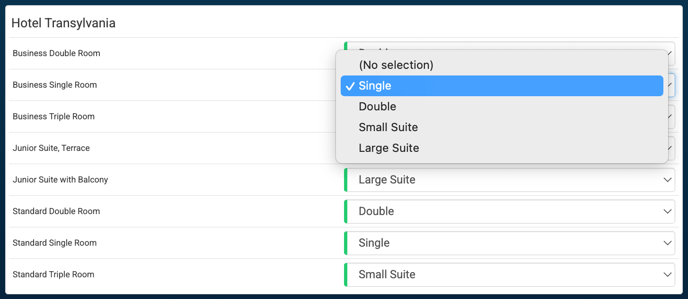
Ensure you make a selection for **every hotel** and **each competitor room type** to maintain accurate mapping.
After completing all mappings, scroll to the bottom of the page and click **Save** to apply your changes.
In the top section of the page, you can also map your own room types from the OTAs.
**Take a look at this video to learn how to map your compset in Atomize:**
You can see your competitors’ room type prices displayed in the Overview page in the system.
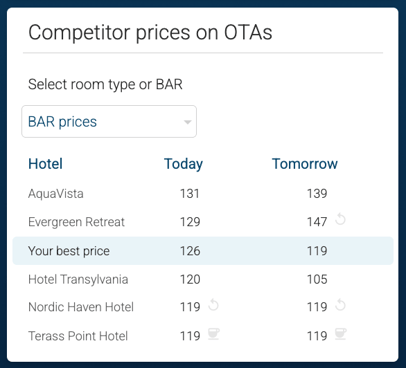
Sometimes you might have the need to change your existing compset. [This article](https://help.atomize.com/how-do-i-change-my-comp-set?hsLang=en) will give you insights into what to consider when selecting compset and how to go about to change it.
- [Product Updates](https://help.atomize.com/migration/product-updates?hsLang=en#main-content)
- [Latest releases](https://help.atomize.com/migration/product-updates?hsLang=en#latest-releases)
- [Previous releases](https://help.atomize.com/migration/product-updates?hsLang=en#previous-releases)
- [Frequently Asked Questions](https://help.atomize.com/migration/frequently-asked-questions?hsLang=en#main-content)
- [Data discrepancies](https://help.atomize.com/migration/frequently-asked-questions?hsLang=en#data-discrepancies)
- [Rate discrepancies](https://help.atomize.com/migration/frequently-asked-questions?hsLang=en#rate-discrepancies)
- [Price recommendations](https://help.atomize.com/migration/frequently-asked-questions?hsLang=en#price-recommendations)
- [KPI calculation](https://help.atomize.com/migration/frequently-asked-questions?hsLang=en#kpi-calculation)
- [Group booking](https://help.atomize.com/migration/frequently-asked-questions?hsLang=en#group-booking)
- [Integrations](https://help.atomize.com/migration/frequently-asked-questions?hsLang=en#integrations)
- [Holidays and special events](https://help.atomize.com/migration/frequently-asked-questions?hsLang=en#holidays-and-special-events)
- [Forecast](https://help.atomize.com/migration/frequently-asked-questions?hsLang=en#forecast)
- [Features and functionalities](https://help.atomize.com/migration/features-and-functionalities?hsLang=en#main-content)
- [Main dashboard](https://help.atomize.com/migration/features-and-functionalities?hsLang=en#main-dashboard)
- [Price recommendations](https://help.atomize.com/migration/features-and-functionalities?hsLang=en#price-recommendations)
- [Pricing controls](https://help.atomize.com/migration/features-and-functionalities?hsLang=en#pricing-controls)
- [Autopilot](https://help.atomize.com/migration/features-and-functionalities?hsLang=en#autopilot)
- [Real-time price optimization](https://help.atomize.com/migration/features-and-functionalities?hsLang=en#real-time-price-optimization)
- [Compset data](https://help.atomize.com/migration/features-and-functionalities?hsLang=en#compset-data)
- [Forecasting](https://help.atomize.com/migration/features-and-functionalities?hsLang=en#forecasting)
- [Restriction management](https://help.atomize.com/migration/features-and-functionalities?hsLang=en#restriction-management)
- [Future demand insights](https://help.atomize.com/migration/features-and-functionalities?hsLang=en#future-demand-insights)
- [Other features in the system](https://help.atomize.com/migration/features-and-functionalities?hsLang=en#other-features-in-the-system)
- [Submit a feature request](https://help.atomize.com/migration/features-and-functionalities?hsLang=en#submit-a-feature-request)
- [Best Practices](https://help.atomize.com/migration/best-practices?hsLang=en#main-content)
- [Event Management](https://help.atomize.com/migration/best-practices?hsLang=en#event-management)
- [Making changes in your account](https://help.atomize.com/migration/making-changes-in-your-account?hsLang=en#main-content)
- [Making user changes to your account](https://help.atomize.com/migration/making-changes-in-your-account?hsLang=en#making-user-changes-to-your-account)
- [PMS Changes](https://help.atomize.com/migration/making-changes-in-your-account?hsLang=en#pms-changes)
- [Configurational changes in your account](https://help.atomize.com/migration/making-changes-in-your-account?hsLang=en#configurational-changes-in-your-account)
- [Online training videos for new users and steps to complete for new properties](https://help.atomize.com/migration/online-training-videos-for-new-users-and-steps-to-complete-for-new-properties?hsLang=en)
- [Cloudbeds](https://help.atomize.com/migration/cloudbeds?hsLang=en)
- [Sample Contact Page](https://atomize-4112891.hs-sites.com/sample-contact)
- [Sample About Page](https://atomize-4112891.hs-sites.com/sample-about)
- [Default HubSpot Blog](https://atomize-4112891.hs-sites.com/blog)
[](https://help.atomize.com/?hsLang=en)
Knowledge Base | Atomize
Copyright © 2026, Atomize