---
title: Steps to complete when onboarding is finalized
description: Once your property has been onboarded there are a number of configurational actions you need to complete to be able to fully utilize the system. You find these settings in the settings menu to your right.
---
[Skip to content](https://help.atomize.com/migration/when-onboarding-is-complete#main-content)
English
Show submenu for translations
![Atomize- blue-1.png\]](https://help.atomize.com/hs-fs/hubfs/Atomize-%20blue-1.png?height=40&name=Atomize-%20blue-1.png)
- [Sample Contact Page](https://atomize-4112891.hs-sites.com/sample-contact)
- [Sample About Page](https://atomize-4112891.hs-sites.com/sample-about)
- [Default HubSpot Blog](https://atomize-4112891.hs-sites.com/blog)
Open main navigation
Close main navigation
- [Sample Contact Page](https://atomize-4112891.hs-sites.com/sample-contact)
- [Sample About Page](https://atomize-4112891.hs-sites.com/sample-about)
- [Default HubSpot Blog](https://atomize-4112891.hs-sites.com/blog)
- English
Show submenu for translations
- Go to atomize.com
Go to atomize.com
Hello. How can we help you?
- There are no suggestions because the search field is empty.
1. [Customer Knowledge Base](https://help.atomize.com/migration?hsLang=en)
2. [Online training videos for new users and steps to complete for new properties](https://help.atomize.com/migration/online-training-videos-for-new-users-and-steps-to-complete-for-new-properties?hsLang=en)
# Steps to complete when onboarding is finalized
## Once your property has been onboarded there are a number of configurational actions you need to complete to be able to fully utilize the system. You find these settings in the settings menu to your right.
**User management**
In the user management settings page you can add more users to your account, as well as edit and remove existing ones. Learn more about [user roles and access rights here](https://help.atomize.com/user-management?hsLang=en).
**Compset mapping**
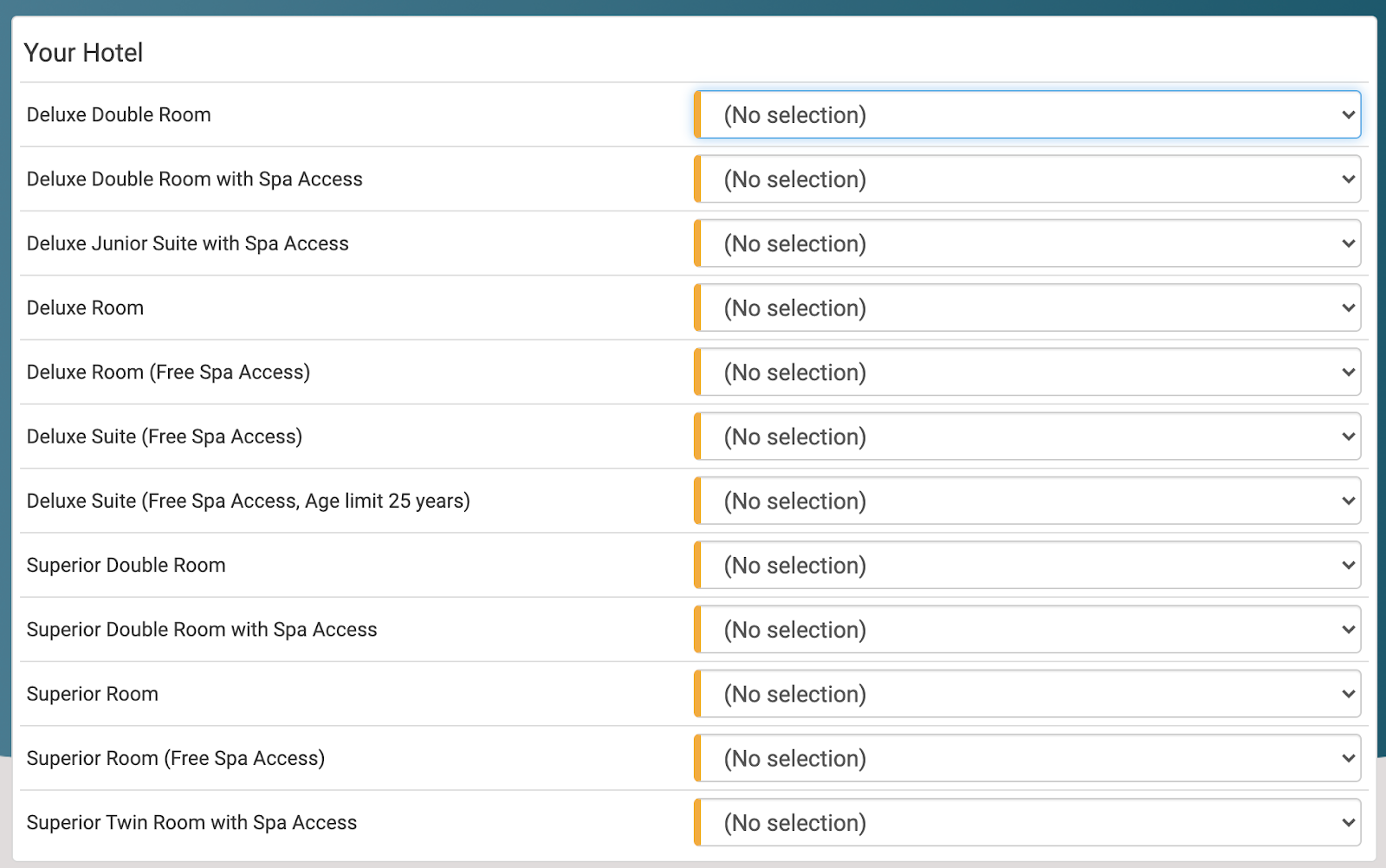
The compset mapping is an important setting in order to get your account fully operational. It allows the system to compare your room types with your selected competitor’s room types.
The very first step is to map your own room types with those found in Booking.com, and then proceed mapping your selected room types with those of your competitors:
Please find more detailed information in the next video:
**Revenue categories**
The revenue categories are an important part of your account’s settings, especially if your hotel is used to having group reservations. Please find more details in the next video:
#### Price Hierarchy
The default price hierarchy has been configured for you during onboarding. If you would like to make changes to that configuration, or if you would like to add one or several seasonal hierarchies, follow the steps explained in the article [How do I change my price hierarchy?](https://help.atomize.com/how-do-i-change-my-price-hierarchy?hsLang=en)
- [Product Updates](https://help.atomize.com/migration/product-updates?hsLang=en#main-content)
- [Latest releases](https://help.atomize.com/migration/product-updates?hsLang=en#latest-releases)
- [Previous releases](https://help.atomize.com/migration/product-updates?hsLang=en#previous-releases)
- [Frequently Asked Questions](https://help.atomize.com/migration/frequently-asked-questions?hsLang=en#main-content)
- [Data discrepancies](https://help.atomize.com/migration/frequently-asked-questions?hsLang=en#data-discrepancies)
- [Rate discrepancies](https://help.atomize.com/migration/frequently-asked-questions?hsLang=en#rate-discrepancies)
- [Price recommendations](https://help.atomize.com/migration/frequently-asked-questions?hsLang=en#price-recommendations)
- [KPI calculation](https://help.atomize.com/migration/frequently-asked-questions?hsLang=en#kpi-calculation)
- [Group booking](https://help.atomize.com/migration/frequently-asked-questions?hsLang=en#group-booking)
- [Integrations](https://help.atomize.com/migration/frequently-asked-questions?hsLang=en#integrations)
- [Holidays and special events](https://help.atomize.com/migration/frequently-asked-questions?hsLang=en#holidays-and-special-events)
- [Forecast](https://help.atomize.com/migration/frequently-asked-questions?hsLang=en#forecast)
- [Features and functionalities](https://help.atomize.com/migration/features-and-functionalities?hsLang=en#main-content)
- [Main dashboard](https://help.atomize.com/migration/features-and-functionalities?hsLang=en#main-dashboard)
- [Price recommendations](https://help.atomize.com/migration/features-and-functionalities?hsLang=en#price-recommendations)
- [Pricing controls](https://help.atomize.com/migration/features-and-functionalities?hsLang=en#pricing-controls)
- [Autopilot](https://help.atomize.com/migration/features-and-functionalities?hsLang=en#autopilot)
- [Real-time price optimization](https://help.atomize.com/migration/features-and-functionalities?hsLang=en#real-time-price-optimization)
- [Compset data](https://help.atomize.com/migration/features-and-functionalities?hsLang=en#compset-data)
- [Forecasting](https://help.atomize.com/migration/features-and-functionalities?hsLang=en#forecasting)
- [Restriction management](https://help.atomize.com/migration/features-and-functionalities?hsLang=en#restriction-management)
- [Future demand insights](https://help.atomize.com/migration/features-and-functionalities?hsLang=en#future-demand-insights)
- [Other features in the system](https://help.atomize.com/migration/features-and-functionalities?hsLang=en#other-features-in-the-system)
- [Submit a feature request](https://help.atomize.com/migration/features-and-functionalities?hsLang=en#submit-a-feature-request)
- [Best Practices](https://help.atomize.com/migration/best-practices?hsLang=en#main-content)
- [Event Management](https://help.atomize.com/migration/best-practices?hsLang=en#event-management)
- [Making changes in your account](https://help.atomize.com/migration/making-changes-in-your-account?hsLang=en#main-content)
- [Making user changes to your account](https://help.atomize.com/migration/making-changes-in-your-account?hsLang=en#making-user-changes-to-your-account)
- [PMS Changes](https://help.atomize.com/migration/making-changes-in-your-account?hsLang=en#pms-changes)
- [Configurational changes in your account](https://help.atomize.com/migration/making-changes-in-your-account?hsLang=en#configurational-changes-in-your-account)
- [Online training videos for new users and steps to complete for new properties](https://help.atomize.com/migration/online-training-videos-for-new-users-and-steps-to-complete-for-new-properties?hsLang=en)
- [Cloudbeds](https://help.atomize.com/migration/cloudbeds?hsLang=en)
- [Sample Contact Page](https://atomize-4112891.hs-sites.com/sample-contact)
- [Sample About Page](https://atomize-4112891.hs-sites.com/sample-about)
- [Default HubSpot Blog](https://atomize-4112891.hs-sites.com/blog)
[](https://help.atomize.com/?hsLang=en)
Knowledge Base | Atomize
Copyright © 2026, Atomize